

What's Actually Inside an AI Agent
A walk through what's inside an AI agent, one file at a time, for people who'd rather understand how they're built than watch one work.


You can vibe-code an agent that works. The day it does something you didn't expect, you find out whether you understand it.
Most "build an agent" content shows you the magic and hides the machine. A prompt goes in, something impressive comes out, and you're left with a black box you can't debug. Fine for a demo. A problem the first time it misbehaves in front of a client.
We build agents for clients, and the useful skill isn't getting one to run. It's understanding what you built well enough to fix it, secure it, and put your name on it.
So here's a small one, explained file by file. You give it a topic, it researches the web, writes a short draft in a fixed style, asks your permission, and saves it. The output is boring on purpose. The point is the anatomy.
We used Vercel eve, their new open-source agent framework, for one reason: in eve, an agent is just a directory of files. Nothing hidden. Every behaviour traces to a file you wrote. That makes it a good way to learn what an agent actually is.
We'll build the whole thing, then cover the three parts most tutorials skip: testing it (evals), securing it, and keeping it from running up a bill.
The repo is public. Clone it, run it, take it apart: https://github.com/HAM-digital/research-draft-agent.

What you need to follow along
About 30 minutes, and three things:
- A Vercel account. The agent routes through Vercel's AI Gateway.
- $20 of AI Gateway credit, the minimum top-up. This matters: a card on file or a Pro plan does not get you off the free tier. Only buying credit does, and the free tier rate-limits you into the ground. More on that trap later.
- A free Tavily account for web search. One API key.
Node 24 and the repo, and you're running.
What it does
You send a topic. It searches the web once, loads a writing-style skill, drafts a short post grounded in what it found, then stops and asks you to approve before saving. On approval, it saves the draft and reads it back.
Small on purpose. Every part of that sentence is a different file.
The files
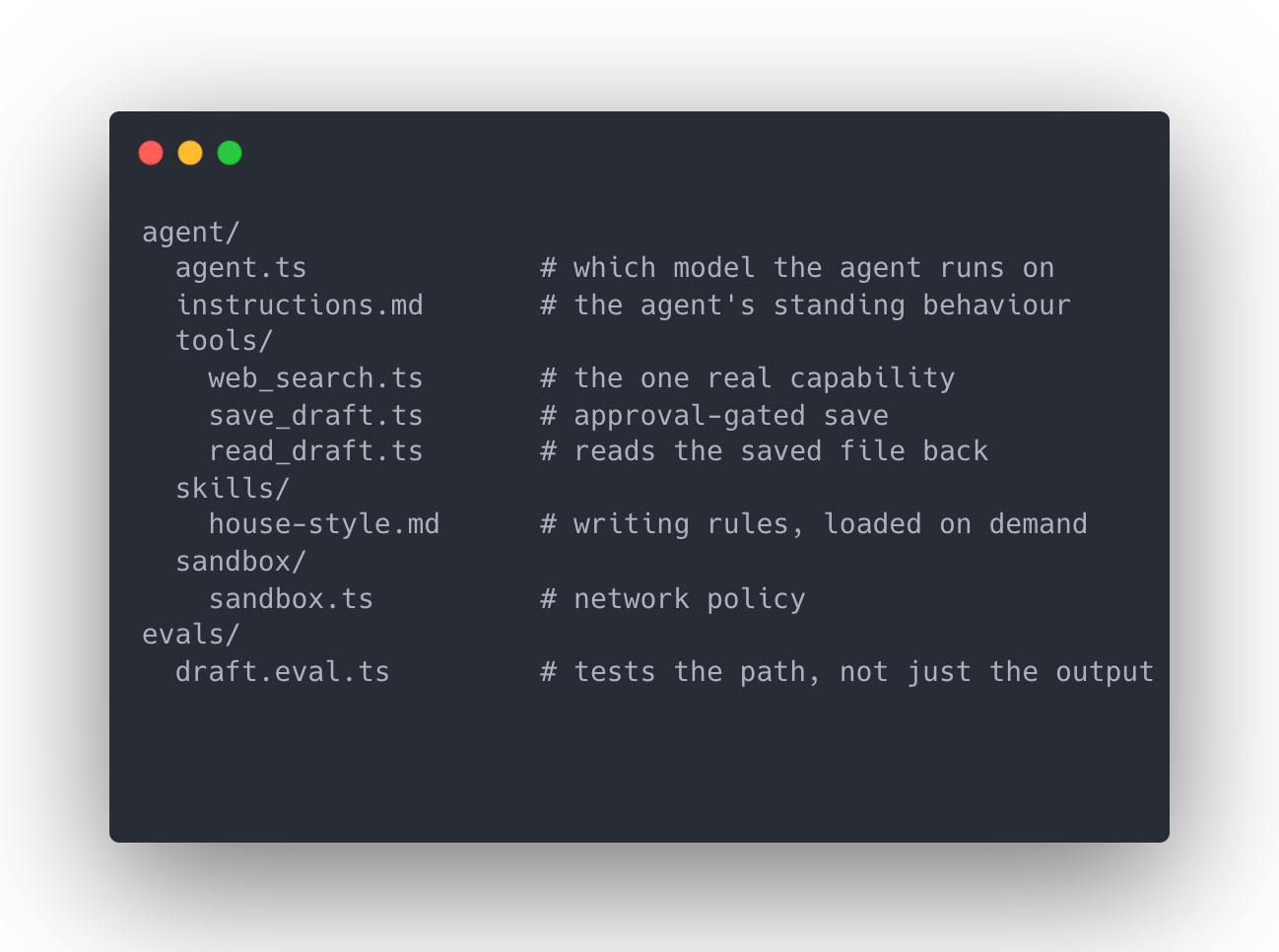
An eve agent is a folder. Here's the whole thing, minus the disabled-tool stubs we'll get to:
Two files make an agent that already answers in a browser: agent.ts and instructions.md. Everything else is capability you add on purpose. We'll take them in build order.
agent.ts, the model
Almost nothing, which is the lesson.
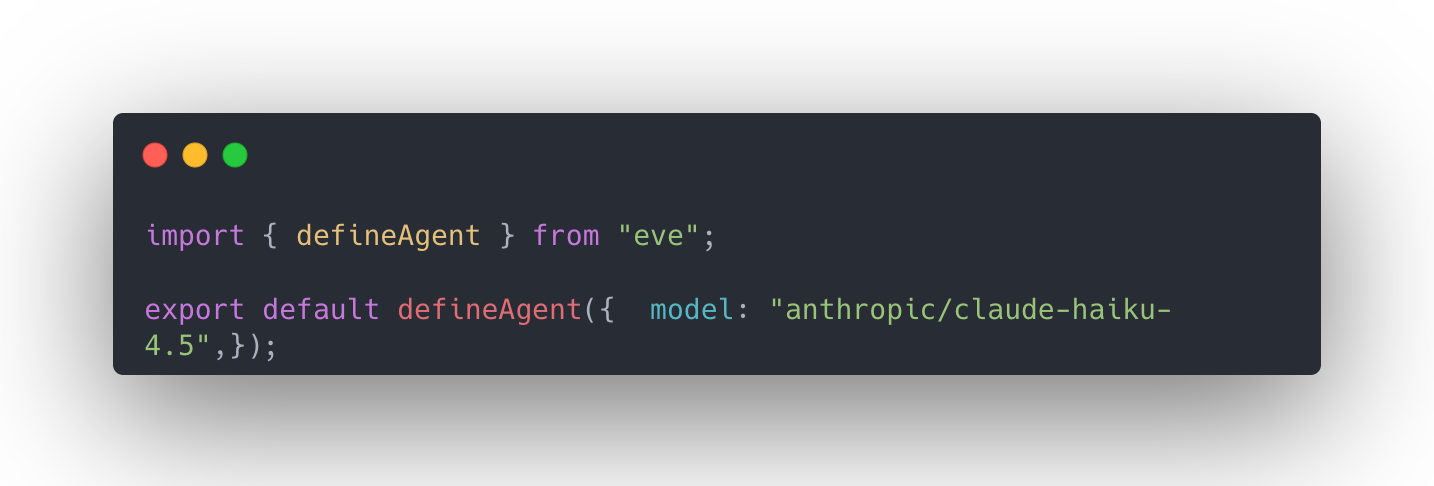
One string. It routes through the AI Gateway, so there's no provider SDK to wire up.
The decision is which model, and it's about cost, not quality. The scaffold defaults to a premium model. We run a small, cheap one. For short drafts it's more than good enough, and a small model costs roughly twenty to forty times less per token than a frontier one. That's the biggest lever on what an agent costs to run, and it's the line most people skip.
instructions.md, the behaviour
The agent's brief. Plain markdown. Search once, load the style skill, write a short draft, cite every claim with a URL, save only when finished.
Two lines earned their place. "Search exactly once" stops the agent chaining search after search, burning tokens. And telling it to cite the full URL, not just the source name, is what makes the drafts carry links you can click.
Worth saying now, because it matters later: this file is guidance, not enforcement. The agent usually follows it. "Usually" is the whole problem, and we'll come back to it.
web_search.ts, the one real capability
The only thing the agent can do in the outside world. A tool is a description that tells the model when to use it, a typed input, and a function that runs.
We used Tavily. Free tier, one key, swappable in five lines. It returns a title, URL, and snippet per result, which is all the model needs to write from.
Every tool in eve has this shape. Write one and you can read all of them. That's the point of a framework where tools are just files.
save_draft.ts, the idea that matters most
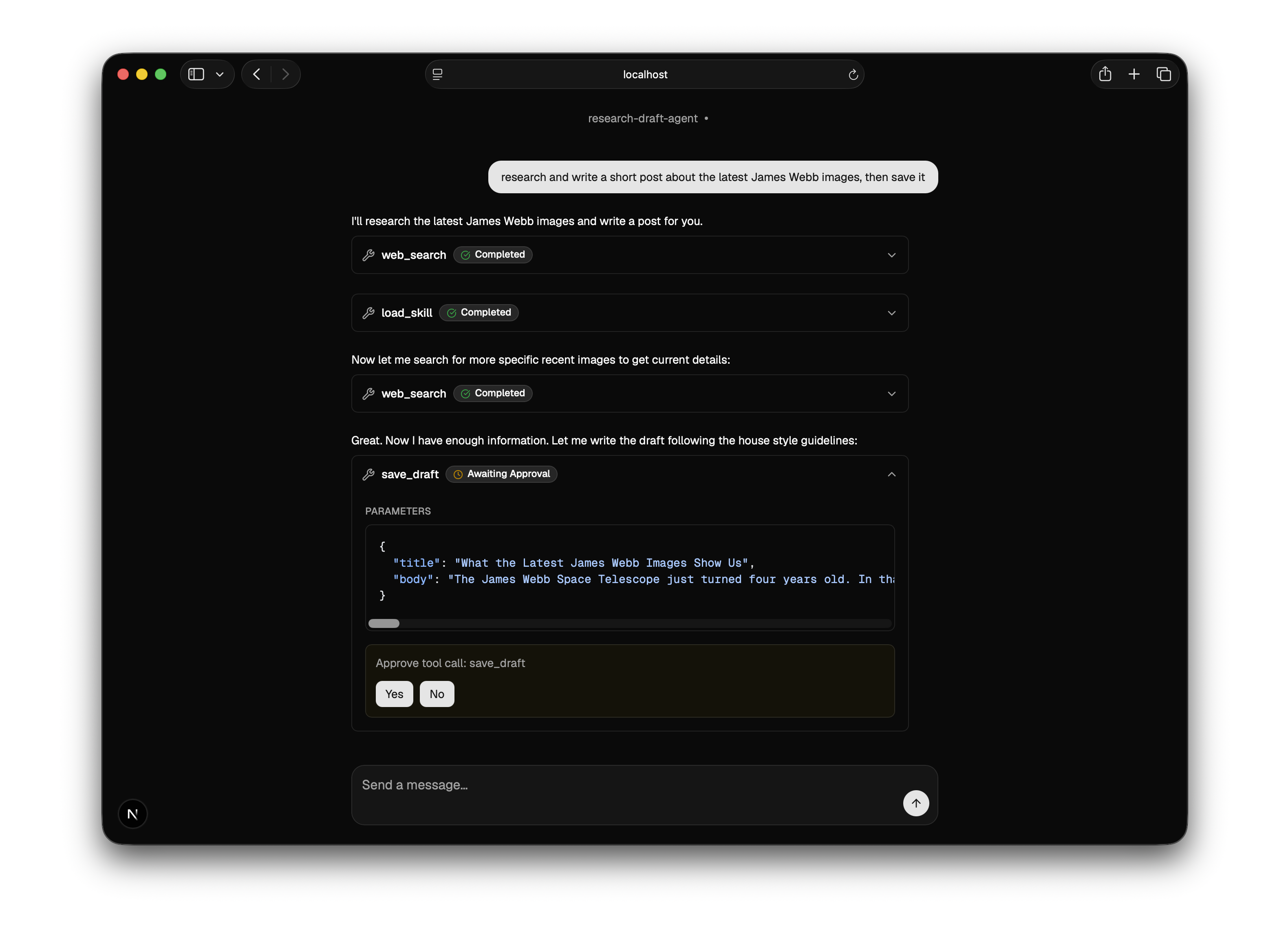
The centrepiece. The agent shouldn't save anything without a human signing off. The obvious way is to write "ask before saving" in the instructions. We did. It isn't enough. Instructions are a suggestion the model can ignore.
The real version puts the control in the code:
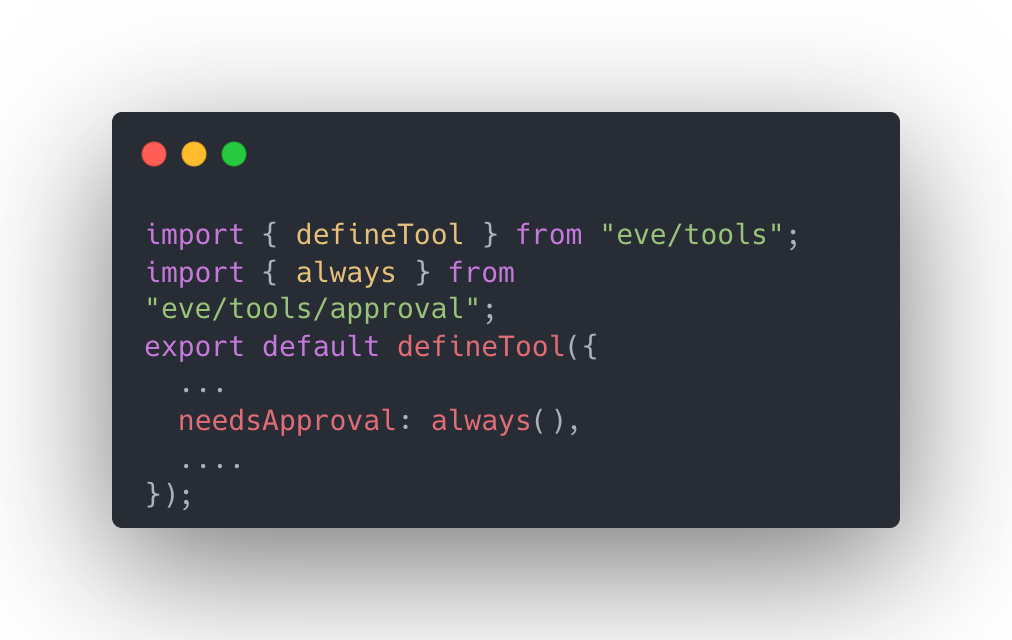
That one line turns the save into a checkpoint. When the agent goes to save, the run pauses. The terminal shows a yes/no prompt. The browser shows an "Approve" button. Nothing is written until you say so.
Telling an agent to ask permission is an instruction. Putting an approval gate in its path is a control. For anything that writes, sends, publishes, or spends, you want the control. It's one line.
read_draft.ts, closing the loop
Small file, real reason. eve runs the agent's file operations in an isolated sandbox, not your project folder. So a saved draft is real but invisible if you look in the repo. This tool reads it back and shows it to you. It's a clean illustration of the sandbox boundary: the agent's workspace is walled off from your machine, and you reach into it on purpose.
house-style.md, a skill loaded on demand
A skill is a set of instructions the agent pulls in only when it needs them. Ours is a writing-style guide: short sentences, plain words, no em dashes, no hype words, no emoji. The same rules this post follows.
Why a skill and not part of the main instructions? Context. You don't want every rule the agent might ever need loaded on every turn. A skill sits on the shelf with a one-line description, and the agent reaches for it when the task fits. Here it loads the style guide before writing, not before searching. The whole file is just rules:
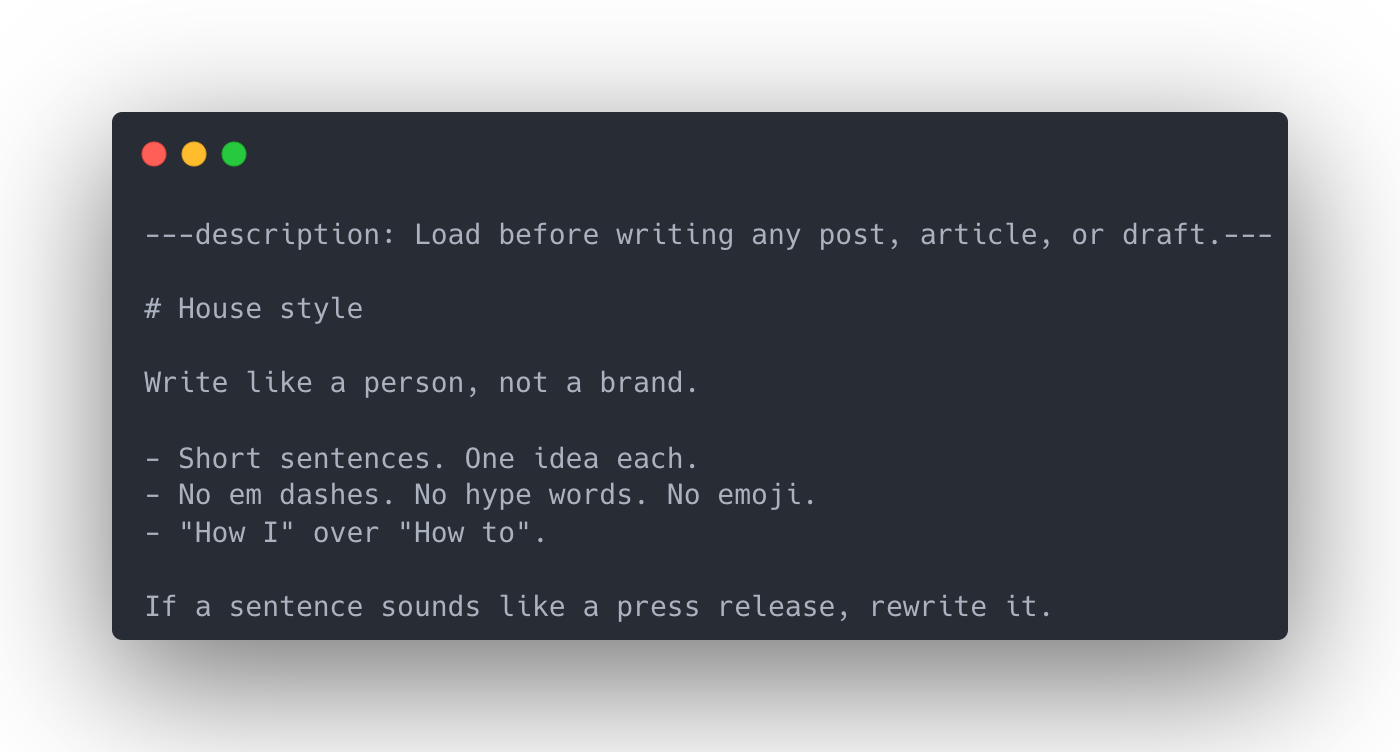
It's also a clean before-and-after. Run the agent without it and you get "breathtaking," "stunning," a line about the cosmos, an emoji. Load the skill and all of that goes. You can watch the voice change.
Testing it, and grading the path not the answer
Most people stop when the agent works once. The gap between a demo and something you'd hand a client is proving it still works tomorrow. That's what evals are for, and eve ships them as a first-class part of the framework.
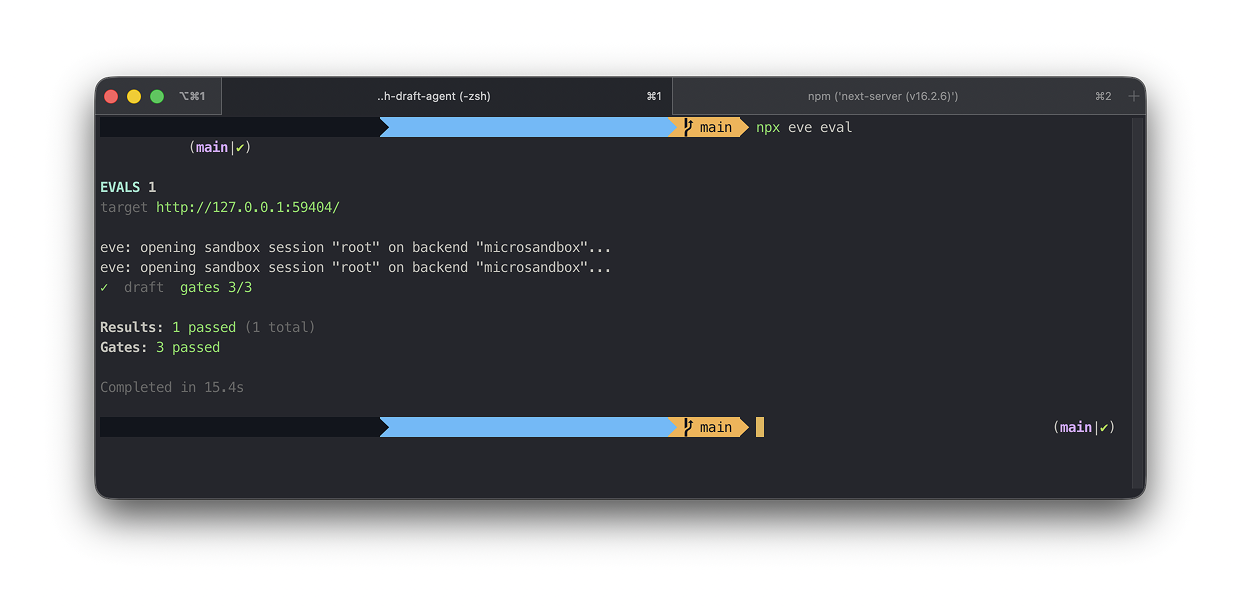
An eval drives the agent through a real request, then asserts on what happened. The instinct is to check the output. That's wrong for anything built on a language model, because the exact text changes every run. A test that depends on wording fails randomly, and a test that fails randomly trains you to ignore it.
So we test the path, not the prose. Our eval checks what's true every run: it searched before writing, it loaded the style skill, it paused for approval before saving. It doesn't check the draft's exact words, because those vary, and that variance is the model behaving normally.
This isn't a small-model problem. Every language model is non-deterministic. A cheap one just makes the lesson show up sooner.
One agent, two front doors
We scaffolded the project with a web chat, so the same agent runs in two places at once: a terminal and a browser, both on the identical code. That split is worth noticing. The agent is the brain. The channel is the door. You can add another door, Slack, an API, without touching the brain. One agent, many doors, and the doors are swappable.
Spending control, the part everyone fears
The horror stories about agents are cost stories. One gets into a loop at 3am and you wake up to a bill. So we treated spend as a feature. Three layers, two of them code.
First, the tool surface. Runaway cost is a loop that won't stop, and a loop needs tools to keep going. Fewer tools, less room to wander. Our agent has exactly what it needs. More on how we enforced that next, because it turned into a security lesson too.
Second, the model. A cheap model is the biggest single lever, and we're on one by default.
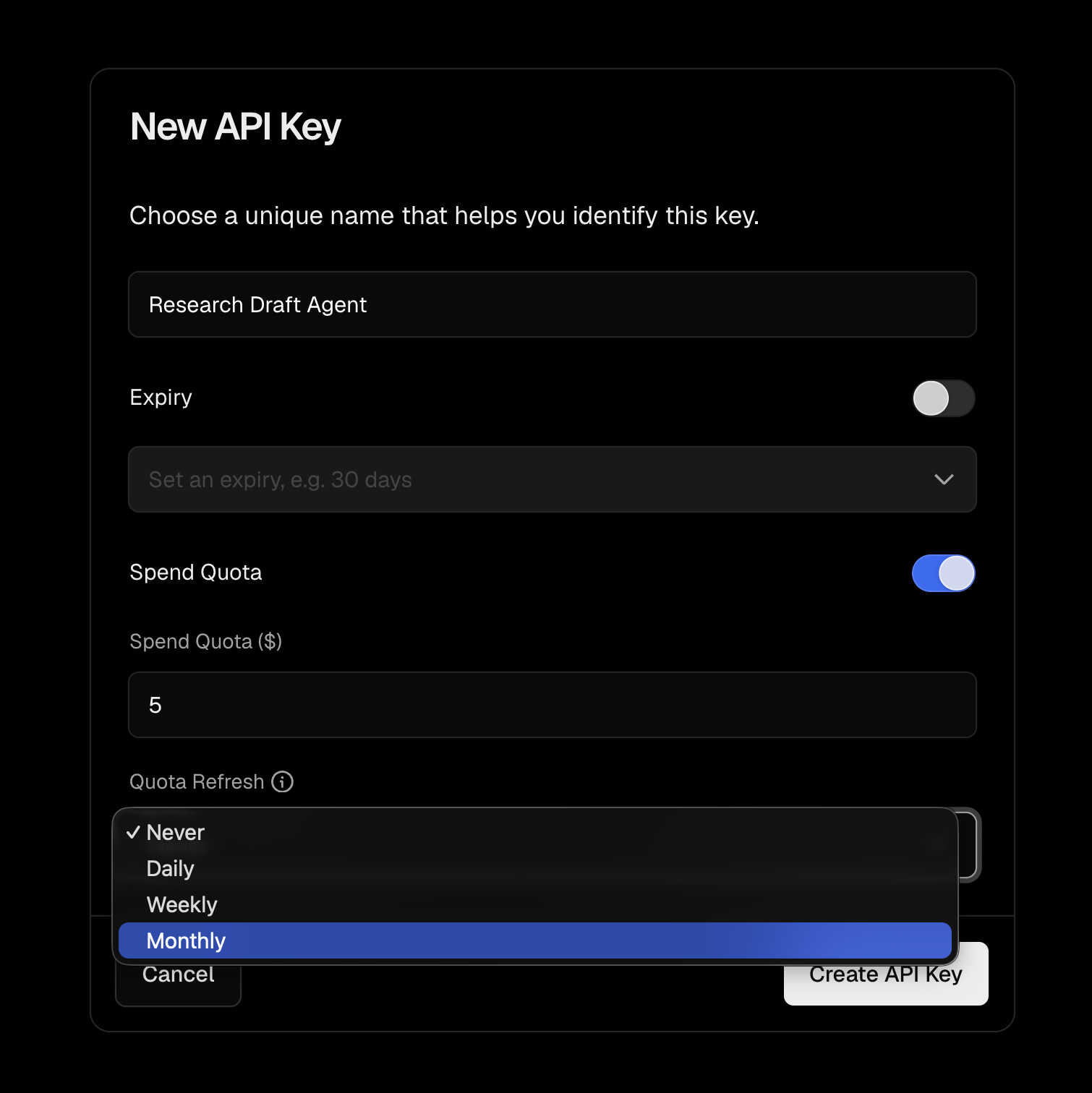
Third, a hard ceiling, and it lives in the dashboard, not the code. Set a spend limit on your AI Gateway key and turn auto-top-up off. That's what actually stops the 3am loop from costing money: not clever code, a budget cap the platform enforces. Ours is capped at five dollars a month. After a full day of building and testing, we'd spent nineteen cents.
Two layers in the repo, one in the dashboard. Together they're the difference between "I made an agent" and "I'd let a client run this."
The security review that caught us out
This is the part I'd most want a client to read.
We'd disabled two of eve's built-in tools, the ones for running shell commands and fetching URLs, and felt locked down. Then we ran a proper security review over the repo, and it found the hole.
eve ships a set of built-in tools every agent gets for free. Disabling two did nothing about the rest. The agent still had a built-in file-write tool, live, with no approval. Read that against the approval gate we were so pleased with: we'd carefully gated our own save behind a human, while a second tool sat next to it that could write any file with no gate at all. The front door was locked. The back door was open.
The lesson is the one from the instructions file, now with teeth. We'd also written "don't use those tools" into the instructions. That's guidance. A prompt injection hidden in a search result could talk the model past it. The only thing that actually removes a capability is removing it at the config layer. In eve that's a one-line file named after the tool:
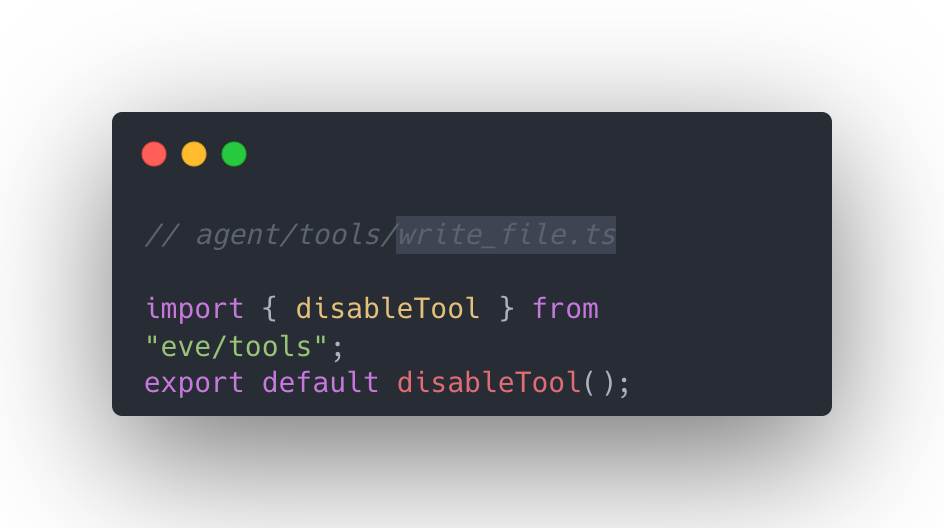
So that's what we did, for every built-in the agent didn't need.
One honest loose end. eve has a built-in tool that lets an agent spawn a copy of itself, and in this version it can't be cleanly disabled like the others. We left it, and we're telling you it's there. Its reach is small, because any copy inherits the same stripped-down toolset, so it can't do anything the main agent can't. But "small reach" isn't "no reach," and the right move with a risk you can't fully close is to name it, not bury it.
We also locked the sandbox to deny all network access, since none of our tools need it. And the agent's channel is locked to local development, so a deployed copy rejects anonymous traffic instead of serving the open internet.
None of this is exotic. It's the difference between an agent that works on your machine and one you'd put your name on.
The honest verdict on eve
We liked it. The directory model is a genuinely good way to learn what an agent is, and approval gates and evals are first-class rather than bolted on. For getting from nothing to a real, testable agent in a day, it's hard to beat.
The trade-off is lock-in. eve itself is open-source and runs on your machine. But the parts that make it production-grade, the gateway, the sandbox, the hosting, are Vercel's. You're free to run it locally. You're locked in the moment you want the managed version of any of it. Not a criticism, just a choice to make on purpose.
One setup note that will save you an afternoon. The AI Gateway has a free tier with a monthly credit, and it's easy to assume that having credit, or a paid Vercel plan, means you're off it. You're not. Rate limits and model access are tied to the tier, and the only thing that moves you off the free tier is buying gateway credit. A card doesn't do it. A Pro plan doesn't. Twenty dollars of credit does. We lost real time to that before we understood it.
What we hope you learned
Understand the file, not the output. The value of an "agent is a directory" framework is that every behaviour traces to a file you can read. Read them.
Instructions aren't controls. Telling a model what not to do is a suggestion. Removing the capability is the guarantee. True for safety and spend both.
Test the path, not the prose. Assert what's true every run: the tools called, the order, the approval waited for. Leave exact wording out, because it varies.
Treat spend as a feature. A small tool surface, a cheap model, a hard budget cap. The difference between a demo and something you'd run unattended.
Name the risks you can't close. We couldn't cleanly disable one built-in. Saying so is worth more than a clean-looking repo that hides it.
Let's talk
Most of the above is judgment, not fact. Working through these calls is the part we enjoy most. If you're weighing a build like this, or you'd rather have someone make these decisions than spend a week learning a new framework, that's what we do.
The repo is yours to take apart: https://github.com/HAM-digital/research-draft-agent.
HAM Studio is a software engineering studio in London and Brentwood. We help startups and growing businesses build, launch, and scale digital products, including the AI and agent work behind posts like this one. See our work →


Let's build something together
Feel free to contact us


©2026 H.A.M. Digital Ltd trading as HAM Studio®.
Registered in England & Wales No. 08355825.
Registered office: 9 Corbets Tey Road, Upminster, England, RM14 2AP